Sharing and Exporting
Exporting a schema
File → Export → Schema (RDFS) exports the currently selected graph to a file. The dialog includes:
- Format — RDF/XML (
.rdf), Turtle (.ttl), or N-Triples (.nt). RDF/XML is the default for CGMES/ENTSO-E compatibility. - Namespaces — the exported file uses the active namespace table for its prefixes.
- Profile header — whether to emit the ontology block first (matching the ENTSO-E release convention) and, if so, whether to auto-generate any missing standard entries from the graph metadata.
The exported file is self-contained: it can be re-imported into RDFArchitect, loaded into any SPARQL engine, or handed to downstream CIM tooling.
Exporting SHACL
See SHACL — Exporting. TTL by default.
Exporting documentation
File → Export → Documentation (HTML, AsciiDoc) exports documentation for the currently selected graph. The dialog includes:
- Document → Format — HTML (
.html) or AsciiDoc (.adoc). Both describe the same content. - Package diagrams → File type — PNG or SVG.
- Package diagrams → Shown as — Link, so a class only links to the diagram of its package, or Picture in the document, so the diagram is shown inline. A package diagram appears once per class of that package, so showing the pictures makes for a considerably longer document.
The generated ZIP file contains the document plus an images/ folder with one diagram per package; the diagram files are named after their package. The documentation lists all classes, categorized by stereotype, followed by the concrete classes, the abstract classes and the enumerations. Each class comes with its package diagram, comment, native members, inherited members and — for enumerations — its values.
Every package diagram is rendered in the browser, so a large profile can take a while. The dialog shows the progress per package while it works and can be stopped with Cancel; nothing is downloaded then. If a diagram cannot be rendered, the export finishes without it and names the affected packages.
AsciiDoc output
The AsciiDoc export is meant for documentation toolchains (Asciidoctor, Antora, DocBook or PDF conversion):
-
Sections start at level 1 (
==), so the file renders as a standalone document. To place it deeper inside a larger document, include it with an offset:include::EQ.adoc[leveloffset=+1] -
Every class gets an anchor prefixed with the name of the exported graph, for example
[[EQ_BoundaryPoint]]. This keeps anchors unique when several profiles are included in the same document, and lets you reference a class from your own text withxref:EQ_BoundaryPoint[]. -
Types and super classes are cross-referenced (
xref:) when the referenced class is part of the same export; classes outside the export are written as plain text so that no reference dangles. -
Package diagrams are referenced as
link:images/<package>.<png|svg>[<package>], or as animage::block when the dialog is set to show them in the document. Keep theimages/folder next to the.adocfile, or point Asciidoctor at it with:imagesdir:.
Share snapshot
File → Share Snapshot creates an immutable snapshot of the currently selected workspace and returns a link of the form https://<host>/?snapshot=<token>. Anyone opening that link loads the workspace as it was at the moment the snapshot was taken — packages, classes, associations, SHACL, everything — and can navigate the schema exactly like the author did, without needing to install anything.
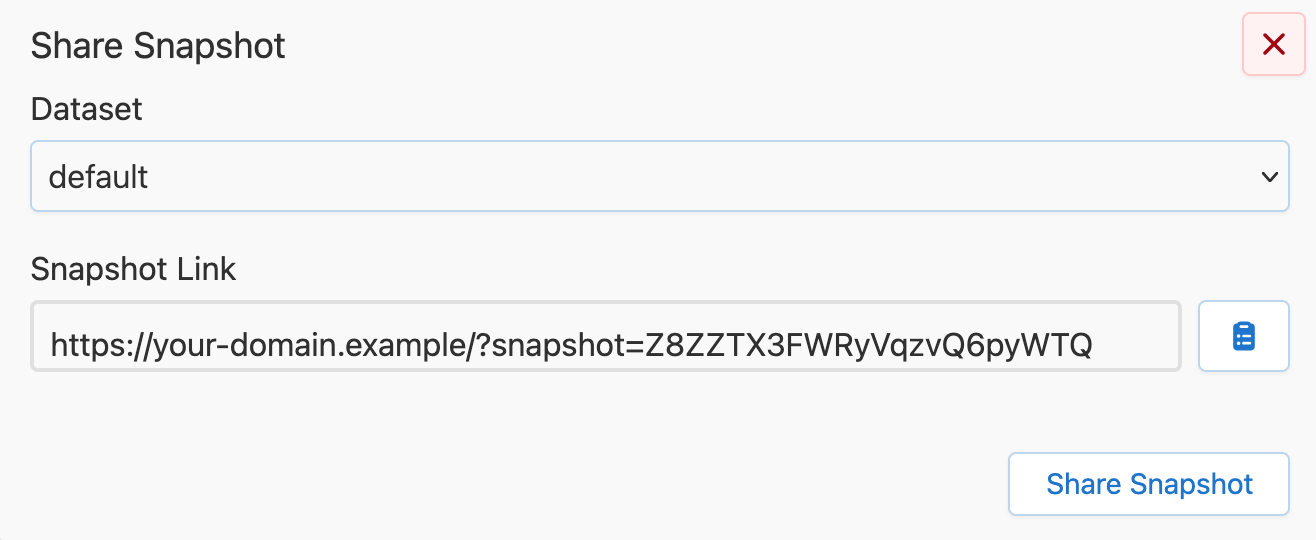
This is the feature to use when you want reviewers to look at a profile without sending RDF files around. Snapshots are stored in Fuseki and persist until the snapshot dataset is deleted from Fuseki.
Three things to be aware of:
- The snapshot link is the access control. Anyone with the link can view.
- Snapshot links load read-only workspaces by default. The loaded workspace can be made editable, but the stored snapshot is not modified.
- In the current version, snapshots cannot be deleted via the UI.