Schema Migration
RDFArchitect ships a guided Schema Migration workflow — View → Migrate Schema — that turns the differences between two schema versions into two artefacts:
- a migration package — a SPARQL UPDATE script that, when run against instance data conforming to the source schema, migrates the data to conform to the target schema, plus the generated SHACL of the target schema for verifying the result;
- a migration report — the written protocol of the migration: every change the script is based on, the decisions you made about it, and your own comments, as a single Markdown document.
Migration runs as a seven-step wizard. You can move back and forth between steps; the decisions of a step are submitted when you press Continue. Leaving the wizard discards the migration context, so a migration is one sitting — plan to finish it and download the artefacts before you navigate away.
Step 1 — Select Schemas
Pick the source ("before") and the target ("after") schema. Four combinations are supported:
| Comparison type | Source | Target |
|---|---|---|
| Stored → Stored | a graph in a workspace | a graph in a workspace |
| Uploaded → Stored | a file from disk | a graph in a workspace |
| Stored → Uploaded | a graph in a workspace | a file from disk |
| Uploaded → Uploaded | a file from disk | a file from disk |
For each side you also declare the CGMES version (2.4.15 or 3.0). That choice drives the validation in step 2 and the validation sections of the migration report; it does not change the generated SPARQL.
Ignore prefixes. Tick this if the two schemas differ in their namespace, for example because the profile moved to a new release IRI. Rename detection then compares only the local names instead of full IRIs, so old:Terminal → new:Terminal is treated as the same resource and reported as a plain change rather than a rename. Renames that consist of nothing but a prefix change are dropped from the review steps and from the report, which keeps a namespace bump from drowning out the real changes.
RDFArchitect computes the difference between the two schemas and uses it as the starting point for the remaining steps.
Step 2 — Validate Schemas
Both schemas are validated against the RDFS/CIM rules of the CGMES version declared for them, side by side. This step is informational — it never blocks the migration — but it is worth reading: a source schema that is already inconsistent will usually produce a migration that needs manual work afterwards.
The same two validation reports are embedded at the top of the migration report, so whoever reviews the migration later sees the state both schemas were in when the script was generated.
Step 3 — Review Class Renames
Lists added classes, deleted classes, and the class renames that were detected between them. A rename proposal is a pairing of a deleted class with an added one, based on name and structural similarity.
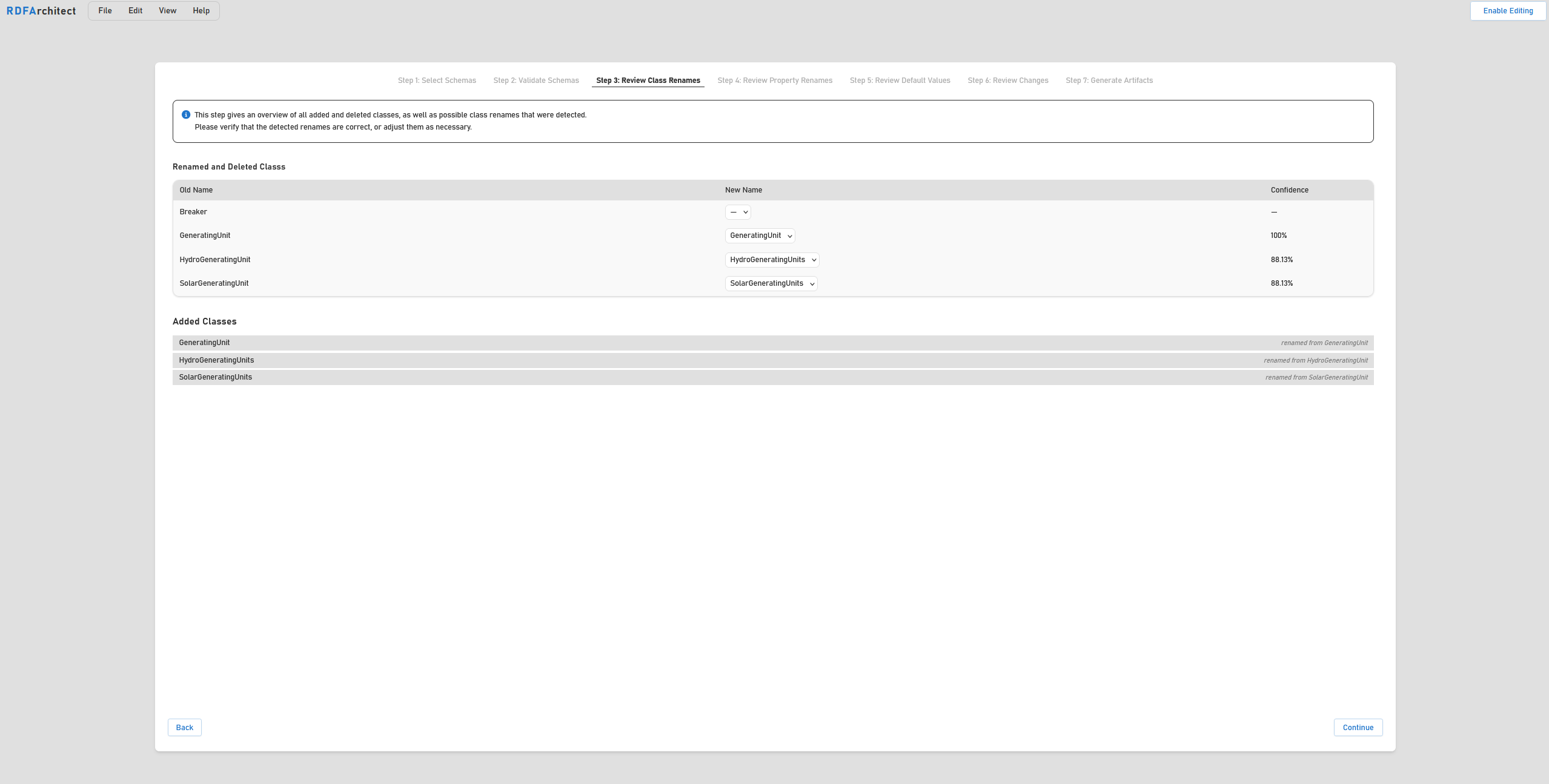
The Renamed and Deleted Classes table names the old class, the added class the detector picked as its successor, and how sure it is of that pairing in the Confidence column. The score is mostly name similarity, with a structural part — superclass, stereotypes, properties — mixed in; 100% means both sides matched exactly, which happens when a class kept its name and shape and only moved to a new namespace.
Verify every proposal: pick a different class from the New Name drop-down to re-map it, or — to dissolve the pairing. A deleted class without a target, like Breaker above, stays deleted. The Added Classes list underneath shows which of the added classes a rename already accounts for.
Every confirmed rename becomes a DELETE/INSERT block that rewrites the RDF type of all affected instances; a class left unpaired stays what it is — deleted or added.
Step 4 — Review Property Renames
The same logic applied to attributes, associations, and enum entries, in three sub-tabs. This step covers the common case where a property was renamed between profile versions without any change in meaning.
Two kinds of proposal are handled for you and never reach the table:
- prefix-only renames, when the migration was started with Ignore prefixes;
- renames of associations that cannot be instantiated (
AssociationUsed = No) — no instance data ever used the old predicate, so there is nothing to rewrite. The detected target is still submitted, it is just not put to you as a question.
Step 5 — Review Default Values
Some changes cannot be migrated without a value to migrate to: a new required attribute, an attribute that became required, a changed datatype, a deleted enum entry. This step collects those values in three sub-tabs. Attributes that block the step are marked with a red asterisk and counted in a banner at the top, so you always know what is still open.
Attributes
The table shows the change, the datatype (old → new where it changed), and the default value. Three options control what happens per row:
- Equivalent — offered where the datatype changed and the attribute already had values. Ticking it declares the old and the new datatype interchangeable for this attribute: all existing values are kept as they are, no conversion is generated, and no default value is needed.
- Don't Init — the attribute is knowingly left uninitialised because no sensible default exists. The migration continues without it; the instances simply have no value for that attribute afterwards. Don't Init All waives every open default value at once, Clear Don't Init takes it back.
- Init Optional — offered for optional attributes, which normally need no default. Ticking it unlocks the default value field, so you can have an optional attribute initialised on all existing instances as well.
Attributes with an enumerated datatype offer their allowed values as a drop-down instead of a free-text field. A default value entered here is instantiated on all existing instances of the class and its deriving classes.
Associations
Instead of a literal, an association default is a SPARQL mapping: a graph pattern that binds a ?target variable, which is inserted into the WHERE clause of the generated update. That way the target of a new association can be derived from the data itself rather than being a fixed IRI. Leave the field empty to add no default target.
Enum Entries
Every deleted enum entry needs a replacement value chosen from the entries that still exist. All instances using the deleted value are rewritten to the replacement.
Step 6 — Review Changes
The consolidated overview of everything the migration will do, grouped by class and, beneath each class, by attributes, associations, and enum entries. Each card carries a badge (Added, Deleted, Changed, Renamed) and expands to the individual field changes with their from → to values.
Every card also has a comment field. This is where the migration protocol is written: a comment explains why a change looks the way it does — which is exactly the information a diff cannot carry. Comments entered here end up in both artefacts:
- in the SPARQL script, as
#comment lines directly above the update block they belong to; - in the migration report, as a quoted note under the heading of the class or property.
Comments are optional, and no comment is required to continue.
Step 7 — Generate Artifacts
Three downloads, each of which can be taken independently:
| Artefact | File | Content |
|---|---|---|
| Migration Script | migration-package.zip | migration.sparql — all DELETE/INSERT WHERE blocks in execution order; shacl.ttl — the generated SHACL of the target schema |
| Summary Report | migration_report.md | The protocol, restricted to the classes that changed directly |
| Detailed Report | migration_report.md | The protocol, expanded to every affected concrete class |
The generated script is plain SPARQL and runs on any SPARQL 1.1-compliant endpoint, for example Apache Jena Fuseki. It can be opened and edited before execution.
The migration report
The report is the migration protocol: the document you keep, attach to a release, or hand to a reviewer. It is Markdown, so it renders in a browser, in an IDE, in a wiki, or in a pull request, and it converts to PDF or DOCX with any Markdown tool.
Both report variants are built from the state of the wizard at the moment you press the download button — including the renames you confirmed, the defaults you set, and the comments you wrote in step 6.
Structure
- Validation Report Original Schema — status, error and warning counts, and the individual issues grouped by resource, for the source schema.
INFO-level issues are omitted. - Validation Report Updated Schema — the same for the target schema.
- Migration Report — Summary View or — Detailed View, opening with a Summary table that counts the directly added, deleted, and changed classes — renames count as changed, and changes a class merely inherits are not counted at all.
- One section per class, in alphabetical order.
Reading a class section
Class headings, and the property headings beneath them, carry the kind of change as a marker; renames spell out both sides:
| Marker | Meaning |
|---|---|
[Added] | new in the target schema |
[Deleted] | gone in the target schema |
[Changed] | still there, but something about it changed |
[Renamed] | matched to a resource with a different IRI; old and new IRI are both listed |
[Added via inheritance] | the property arrived through a changed superclass |
[Deleted via inheritance] | the property disappeared through a changed superclass |
[Inherits changes] | the class itself is unchanged; it is listed for the changes it inherits |
[Indirectly changed] | nothing in the class changed, but a change elsewhere affects it |
Under the heading, your comment appears as a quoted note, followed by the field changes as full sentences — "Datatype set from xsd:string to xsd:integer.", "Was marked required.", "Comment was updated." — and then by sections for Attributes, Associations, and Enum Entries. IRIs are shortened with the configured namespace prefixes wherever a prefix is known.
Two notes are worth looking out for:
- "The datatypes were marked equivalent, so existing values are kept." — the trace of an Equivalent tick in step 5. It documents that a datatype change was deliberately not migrated.
- "Potentially invalid targets due to superclass changes" — a class lost a superclass that an association points to. Instances of the listed classes may no longer be valid targets of that association. The script cannot decide this for you; the report flags it so that you can check it against your data.
Summary or detailed
Both variants describe the same migration; they differ in how inheritance is unfolded.
- Summary lists only the classes that changed directly. Where the changed class is a parent, its affected concrete subclasses are named at the end of the section under Affected concrete classes, but the changes themselves are stated once. Use it for a release note, a review meeting, or a first read.
- Detailed walks every affected concrete class alphabetically and repeats the inherited changes under each one, in separate Inherited Attribute / Association / Enum Entry Changes sections. Nothing is left implicit. Use it when someone has to check a specific class, or when the migration is signed off per class.
A useful habit is to download both: the summary for the release note, the detailed one for the archive.
After generating the script
The wizard's closing step names the recommended order, and it is worth following:
- Verify the source data — validate it against the source schema's SHACL, so that failures after the migration cannot be blamed on data that was already invalid.
- Download the artefacts — the migration package and at least one report.
- Apply the update — run
migration.sparqlagainst a copy of the data first. Take a snapshot or a database backup before touching anything you cannot restore. - Verify the result — validate the migrated data with the
shacl.ttlfrom the package. RDFArchitect produces and manages SHACL but does not run validation itself; use any SHACL engine, for example Apache Jena'sshaclCLI or pySHACL. - Keep the report with the migrated dataset. It is the only record of the decisions that went into the script.
Limitations
Script generation does not yet cover every edge case. Multiplicity changes on associations in particular are not migrated automatically — a property that went from 0..1 to 1..* (or the other way round) needs a follow-up script. The wizard states this before you download.
Because of that, validating the migrated data against the target schema's SHACL is not optional in practice, and any inconsistency it reports has to be adjusted manually.