Organising a Schema: Workspaces, Graphs, Packages
Creating a package
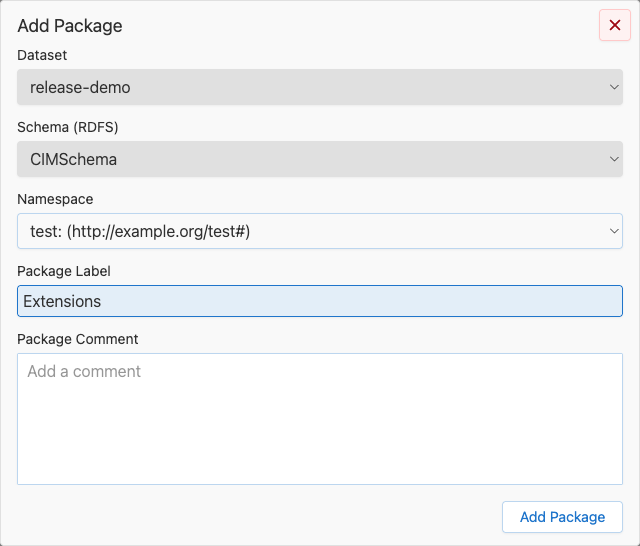
With a graph selected, choose Edit → New → Package. You provide a label and a URI namespace. Packages can be edited (Edit → Edit → Package) and deleted (Edit → Delete → Package) from the same menu.
The default package is reserved — it represents classes that have not been assigned to any explicit package. It cannot be renamed or deleted.
External vs. internal packages
A graph usually contains two categories of packages:
- Internal packages — defined in the schema itself; fully editable.
- External packages — referenced by the schema but not defined in that schema. They are visible for navigation and class assignment but not editable from the current graph.
The navigation tree marks these two categories separately, and the editing menus disable editing actions for external packages automatically.
Creating a class
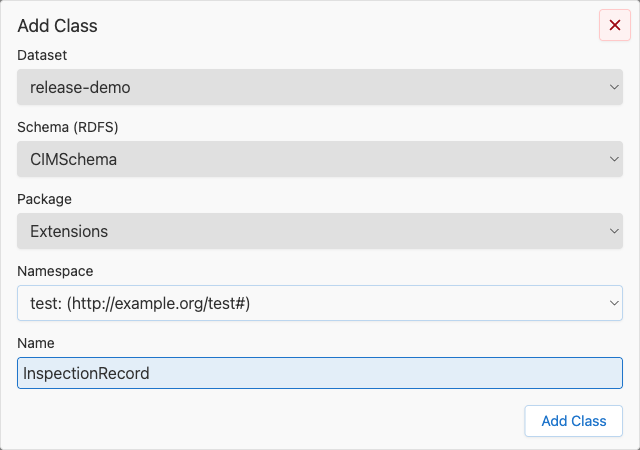
From Edit → New → Class you pick the target workspace, graph, package, and a URI namespace for the new class. The combination of label and URI namespace must be unique within the graph; the editor validates this before allowing save. On save, the class opens immediately in the class editor on the right.
Copying and pasting classes
Edit → Copy Class (Ctrl+C) puts the selected classes on the clipboard. Edit → Paste offers four variants, also available from the context menu of a package or of the diagram background, which decides the target package:
- Paste (Ctrl+V) — the class with its attributes, enum entries, associations, and super class.
- Paste without Attributes/Enum Entries (Ctrl+Shift+V)
- Paste without Associations (Ctrl+Alt+V)
- Paste Bare (Ctrl+Shift+Alt+V) — the class on its own, as an abstract class.
A pasted class keeps its label, unless the target schema already uses it: then it becomes MyClass-Copy, and MyClass-Copy(1), MyClass-Copy(2), … for further copies. Classes pasted together keep pointing at each other: when one of them is renamed this way, the others refer to the renamed class, not to the one they were copied from.
A paste is all or nothing. If one of the copied classes is gone by the time it is pasted — deleted in the meantime, or in a schema that was deleted — nothing is pasted and the paste reports a failure.
Classes the copy points at
A class usually refers to other classes: the data types of its attributes, the target classes of its associations, and its super class. When the target schema does not contain some of them, a dialog lists what is missing before the paste runs, grouped by kind and with the attribute or class that uses it. Everything is preselected — clear whatever should stay out.
Association targets and super classes are copied as stubs: label and URI only, without attributes or associations. Data types are copied with their attributes, including the data types those attributes need in turn; such a follow-up data type is checked and locked in the list, labelled with the entry that requires it.
The dialog only covers what the chosen variant actually copies — after Paste without Associations it never asks about association targets, and Paste Bare never opens it at all. A super class that is left behind stays on the pasted class as a reference: the class editor shows it under Derived from even though the schema does not define it.
Deleting
Every destructive action (delete schema, delete workspace, delete package, delete class) goes through a confirmation dialog that states what will be removed. Deletions participate in undo/redo like any other edit (see Reviewing changes).